
Offline · No account · Nothing to sign in to
Your whole day, in one quiet app.
Habits, money, notes, reminders and eleven more skills, with 50 goals that set them up in one tap. No account, no ads, no internet: it all stays on your phone.
Android now · iPhone soon. On your computer too
- skills
- 15
- goals
- 50
- accounts to make
- 0


FIFTEEN SKILLS
Turn on the ones you use. Leave the rest off.
Each skill does one thing well, and each has its own page here.
- MoneySpending, income and transfers
- SplitThe bill and the tip, fairly
- HabitStreaks that allow a day off
- CounterEvery count is one tap
- NotesNotes and checklists
- JournalEach day and its mood
- NotifyReminders in plain words
- EventsThe days left to what’s ahead
- CapsuleLetters sealed until a day
- DataYour data use, live · Android
- ToolboxLevel, compass, ruler and more
- TrackNumbers over time
- FocusWork, then a break
- SportWorkouts, matches and rounds
- ReadingYour books, page by page
50 GOALS
Pick a goal. One tap sets up the rest.
Ramadan adds the fasts, the Quran pages, a dhikr counter and the days to Eid, across seven skills. Free, and you can remove it later.
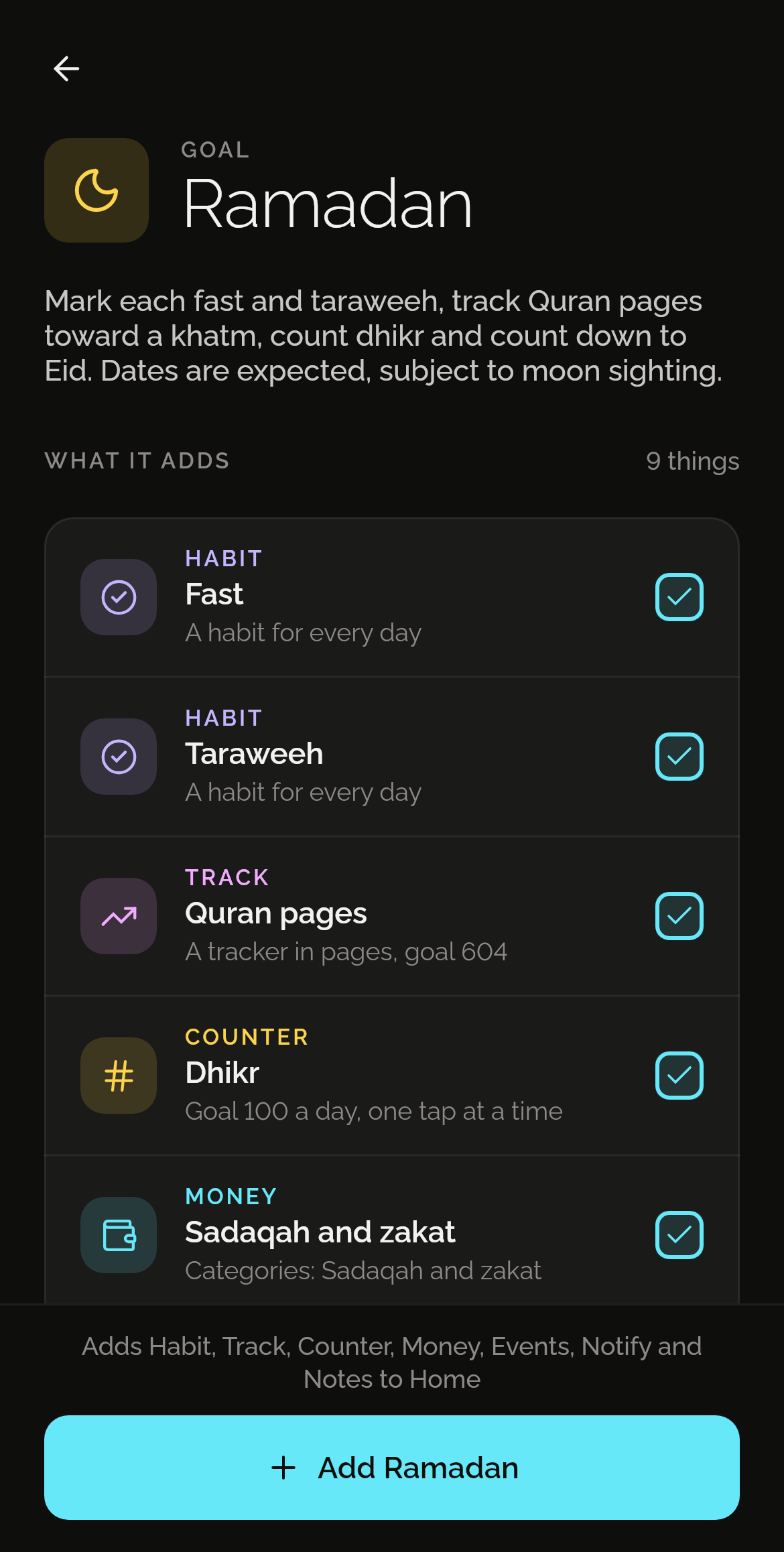
What Ramadan adds
- HabitFast
- TrackQuran pages
- CounterDhikr
- MoneySadaqah and zakat
- EventsEid al-Fitr
- NotifySuhoor: time to eat
Yours, and only yours
No account
Nothing to sign up for, nothing to log in to.
Works offline
Every skill works without a connection.
No ads, no tracking
No ads, analytics or tracking code, and no network calls of its own.
Backups you hold
One file you keep, locked with a password if you like.
LINKS
Skills that work together.
Let one skill do the next one’s part. Note your page in Reading and your Read habit is ticked. You make each link as a sentence, and it works offline like everything else.
If Read in Habit isn’t done by 21:00, remind me with Notify.
Every night, log the total of Push-ups in Counter to Push-ups in Track.
Eight links so far, between Reading, Sport, Focus, Habit, Counter, Notify and Track. Two links are free in each profile, 20 with Pro.
See all eight linksGEMS
A gem for every good week.
Use a skill on enough days of a week and it earns a gem in its own colour. Gems can’t be bought, and the ones you earn are yours to keep.
- Habit
- Money
- Journal
- Counter
- Notes
- WeeklyUse a skill on enough days of a week.
- MonthlyThree weekly gems in a month, in the same skill.
- RareMilestones, like your 100th entry or 500th check-in.
Free, in Habit, Money, Journal, Counter, Notes, Track, Focus, Sport and Reading. Turn off the skills you don’t use, and keep every gem you earned.
Rewards without streak pressureALSO ON YOUR COMPUTER
Shadowkit, on your computer too.
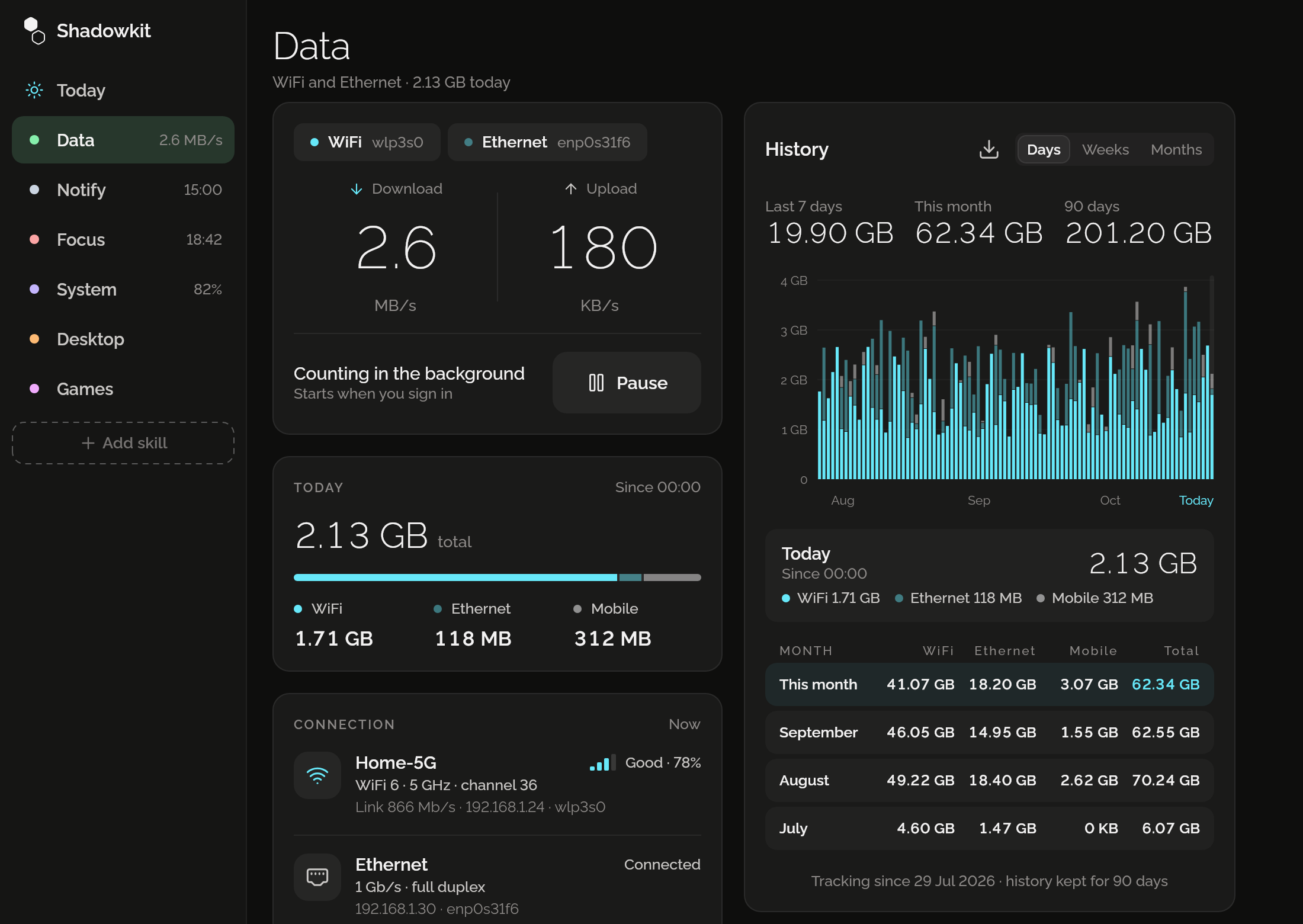
Network use, reminders, focus, the battery and small games. On Linux now, Windows and macOS later. Free, and it all stays on your computer.
Out now on Android.
Scan the code with your phone’s camera, or tap Google Play. The iPhone version is coming soon.Tap Google Play to get it. The iPhone version is coming soon.
On a computer? Shadowkit for Linux is out now.Get it for Linux
Questions
Do I need an account?
No. Open the app and start. Everything stays on your phone.
Does it work offline?
Yes. Every skill works without a connection, and the app makes no network calls of its own: on Android it doesn’t even have the internet permission. Buying Pro goes through Google Play’s own app.
Is Shadowkit free?
Yes, to start: every skill is free to use, with limits such as 5 habits and 3 Money accounts, and Focus, Sport and Toolbox have none. Pro removes the limits. Shadowkit for Linux is free, with no Pro. See pricing
What does Pro add?
No limits, more profiles, Money tags, CSV and PDF export, and on Android every widget and all 90 days of Data. It’s yearly, monthly or once for life, bought in the app through Google Play. See pricing
Can I keep work and personal separate?
Yes. Profiles each have their own data, and you can switch in one tap.
Which skills are included?
Money, Data, Notify, Habit, Counter, Notes, Journal, Events, Capsule, Split, Toolbox, Track, Focus, Sport and Reading, with more to follow. Data is on Android, and Toolbox’s flashlight is on Android only; Data, Notify and Focus are on Linux computers too, with System, for the battery and the disk, Desktop, for GNOME, and Games, for the wait.
How does Home work?
Home is a row of pages you swipe between. Today shows every skill at a glance, one line each, and each skill has its own page that does everything. Add or remove skills any time with the + at the end of the row of names at the top, and choose what Today shows, and in what order, with Customize Today at its foot.
Can skills work together?
Yes, with Links: one skill does the next one’s part. Note your page in Reading and your Read habit is ticked, get a reminder only on days a habit isn’t done yet, or log a counter’s total to a tracker each night. The chain button at the foot of a skill’s page shows its ideas. Two links are free, twenty with Pro, and like everything else they work offline.
What are gems?
Something to collect as you go. Use a skill on enough days of a week and it earns a gem in its own colour; three in a month earn a monthly gem, and milestones earn rare ones. They are free, can’t be bought, and are kept for good.
When can I get it?
Now, on Android and Linux computers: tap Download to get it. The iPhone version is coming soon.
From the blog
- Meet Goals: fifty one-tap setups, all free
Quit smoking, Ramadan, a 52-week savings challenge: pick a goal and one tap sets up the habits, counters, reminders and notes it needs. All fifty are free.
- How much to save each month for a goal, worked out
The sum for any savings goal and date: what’s left divided by the months or weeks to go, a table for common goals, and what to do if you fall behind.
- No-spend challenge rules: what counts, slips and ideas
How to set your no-spend challenge rules: what counts as essential, what counts as a slip, how long to go, free things to do, and what to do after a slip.