Shadowkit Focus: Pomodoro focus timer for Android

Work, then a break.

A Pomodoro-style timer for a stretch of work and the break after it: 25 minutes and 5 unless you change them, with a longer break every fourth time. It rings with the app closed, and keeps each session with what it was for, so you can see where your time went.

It installs Shadowkit, which starts empty: add Focus and nothing else.

  • Free, except two widgets
  • No account
  • Works offline
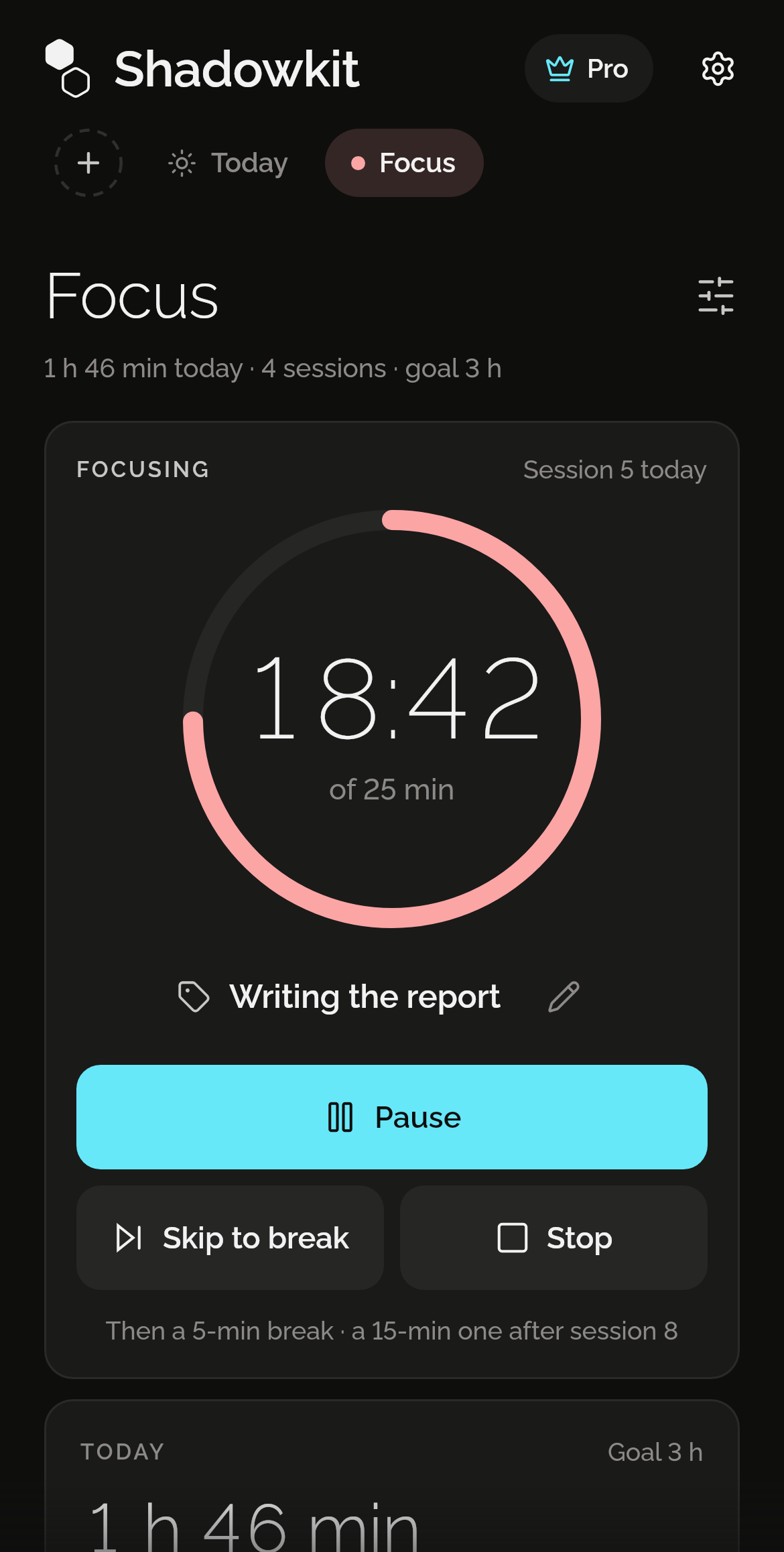
Shadowkit Focus’s page on Home: 1 h 46 min today, 4 sessions, goal 3 h; Focusing, session 5 today, 18:42 left of 25 min in a red ring, on Writing the report, with Pause, Skip to break and Stop, then a 5-min break and a 15-min one after session 8; and Today below it.

Say what it’s for, then start

Pick one of the last labels you used, type a new one or leave it blank, and choose 25 · 5, 50 · 10, 90 · 15 or lengths of your own. Then Start focus: the ring counts down, and you can pause, skip to your break or stop.
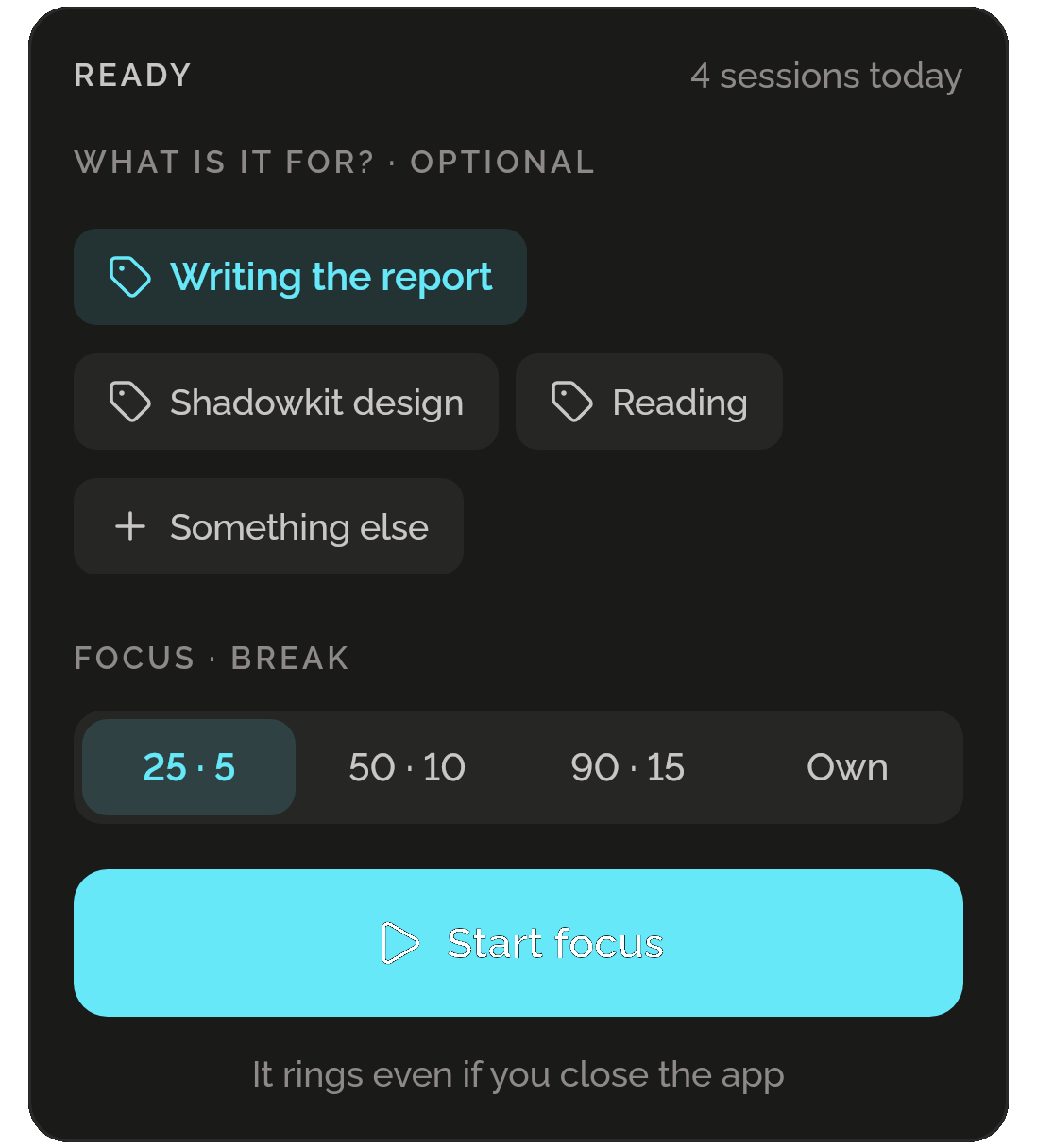
Focus’s timer, Ready, 4 sessions today: What is it for? · Optional, with Writing the report chosen, Shadowkit design, Reading and Something else; Focus · break with 25 · 5 chosen, 50 · 10, 90 · 15 and Own; Start focus; and It rings even if you close the app.

Breaks that come to you

When a session ends, Focus rings, even with the app closed, and your break starts: 5 minutes, and every fourth break of the day a longer one. Stand up, look away, take 5 more minutes or get back to it now.
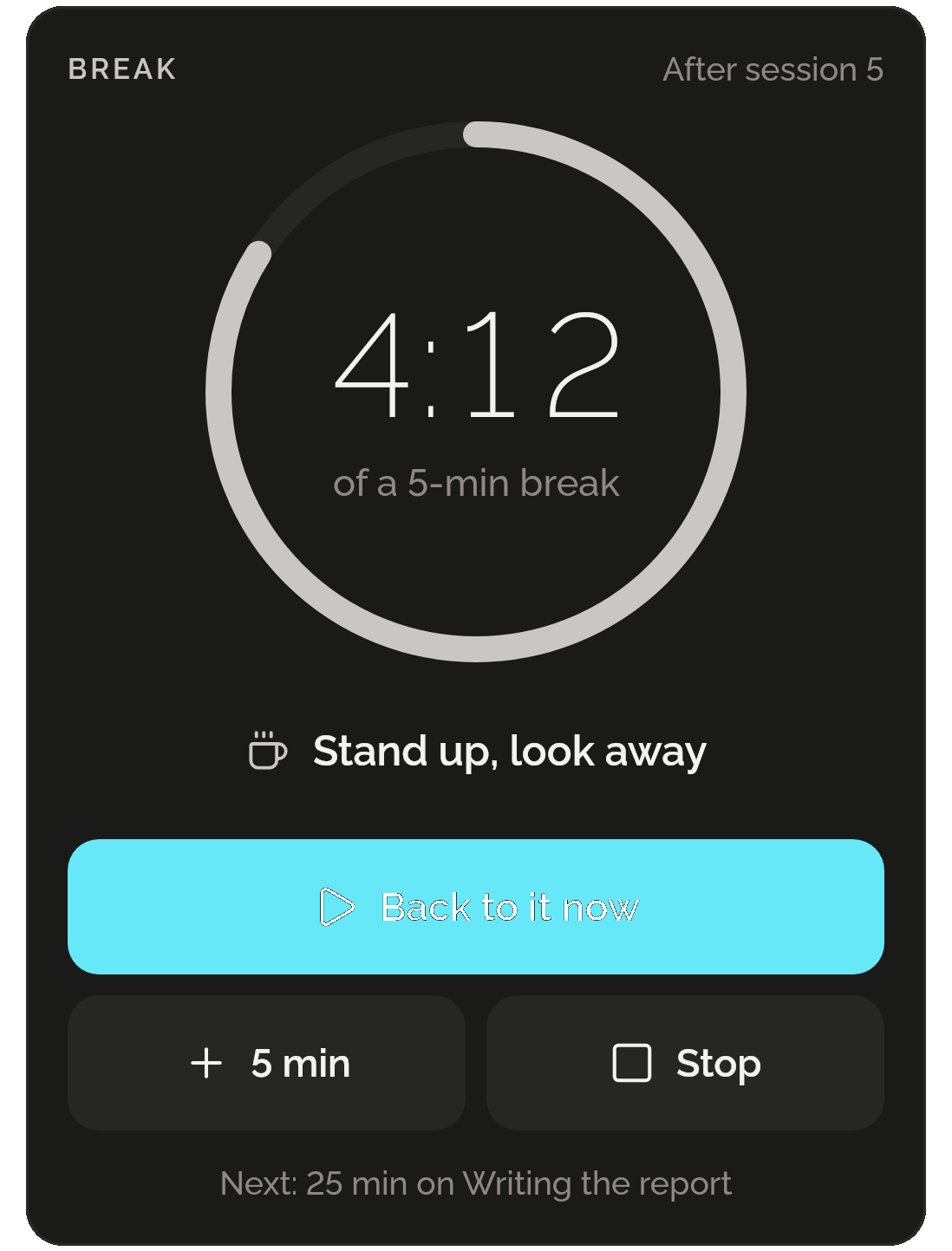
A break after session 5: 4:12 left of a 5-min break in a grey ring, Stand up, look away, Back to it now, plus 5 min and Stop; next, 25 min on Writing the report.

Today, against your goal

Your focused time today beside your daily goal, 3 hours unless you change it, and the day’s sessions and breaks along the hours. Reach the goal and Focus tells you, once.
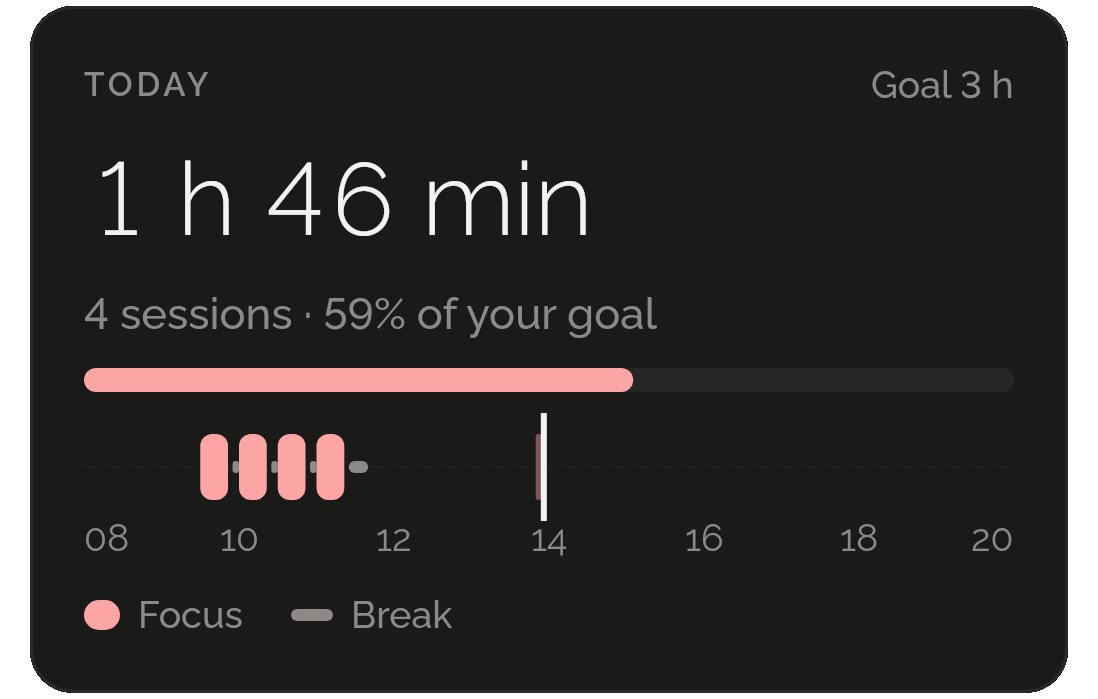
Today: 1 h 46 min, 4 sessions, 59% of a 3-hour goal with its bar, and the day from 08 to 20 with the morning’s sessions and breaks and a line for now.

Every day, kept

The last 14 days, 12 weeks or 12 months as bars, with the goal drawn across the days, the last 7 days’ total, the average a day and how many days reached the goal. Keep 90 days, a year or everything.
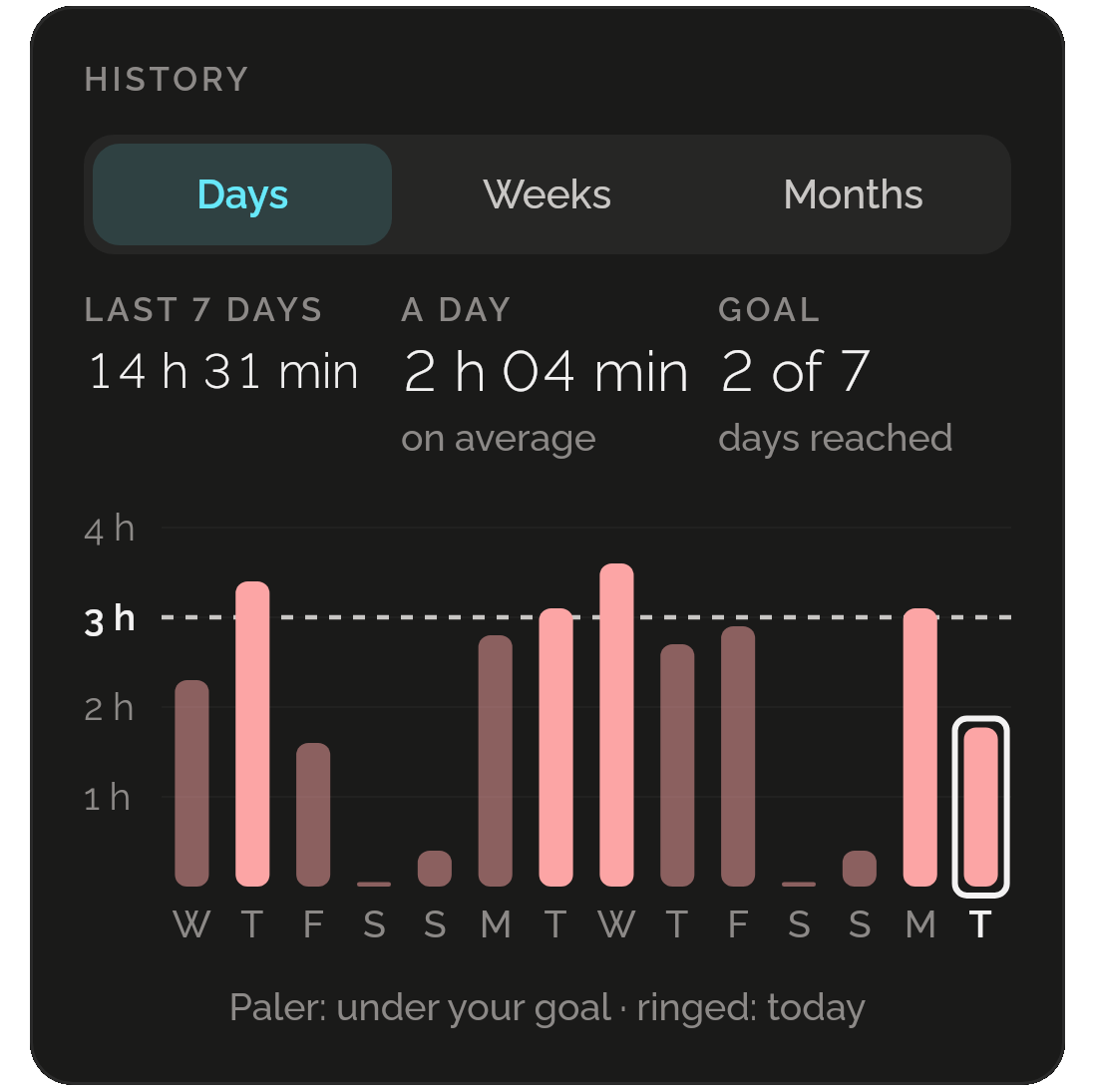
History by days: 14 h 31 min in the last 7 days, 2 h 04 min a day on average, the goal reached on 2 of 7 days, and 14 bars under a dashed 3-hour line, the days under it paler and today ringed.

What it went to

The last 7 days by what each session was for, the most first. Time with no label counts too.
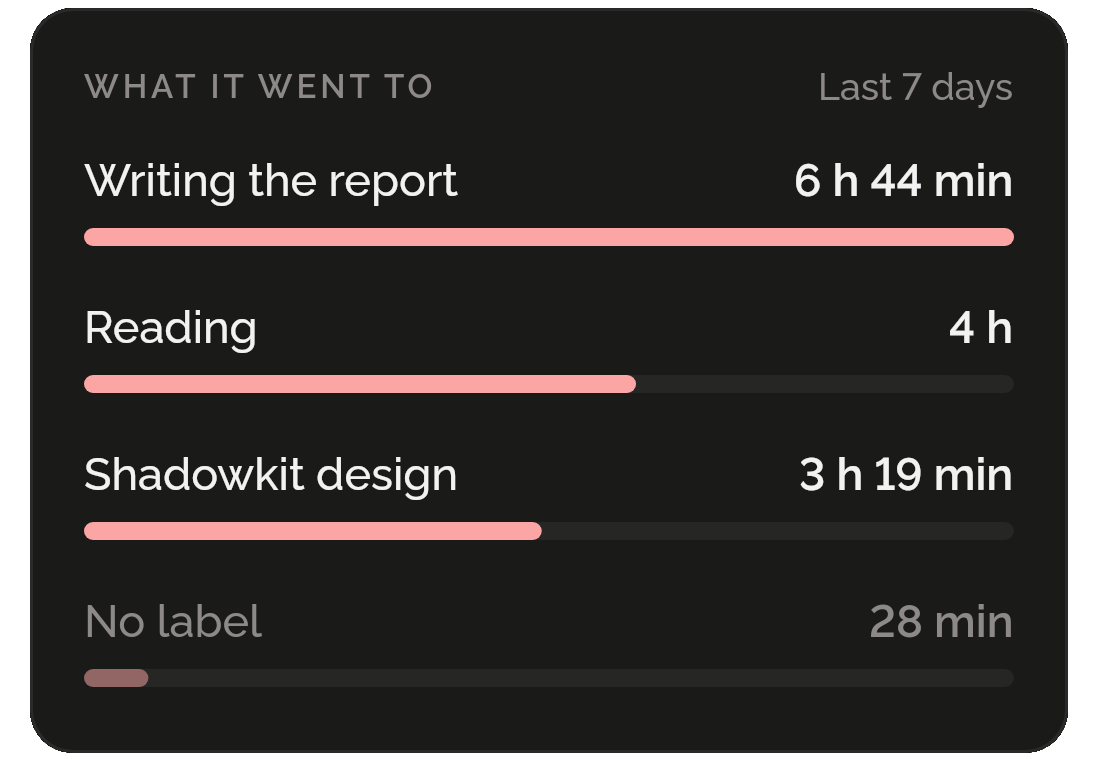
What it went to, last 7 days: Writing the report 6 h 44 min, Reading 4 h, Shadowkit design 3 h 19 min, and No label 28 min.

Your lengths, your goal

A session from 5 to 180 minutes and a break from 1 to 60, the longer break and after how many sessions it comes, whether breaks and the next session start by themselves, and a daily goal in half-hour steps, or none.
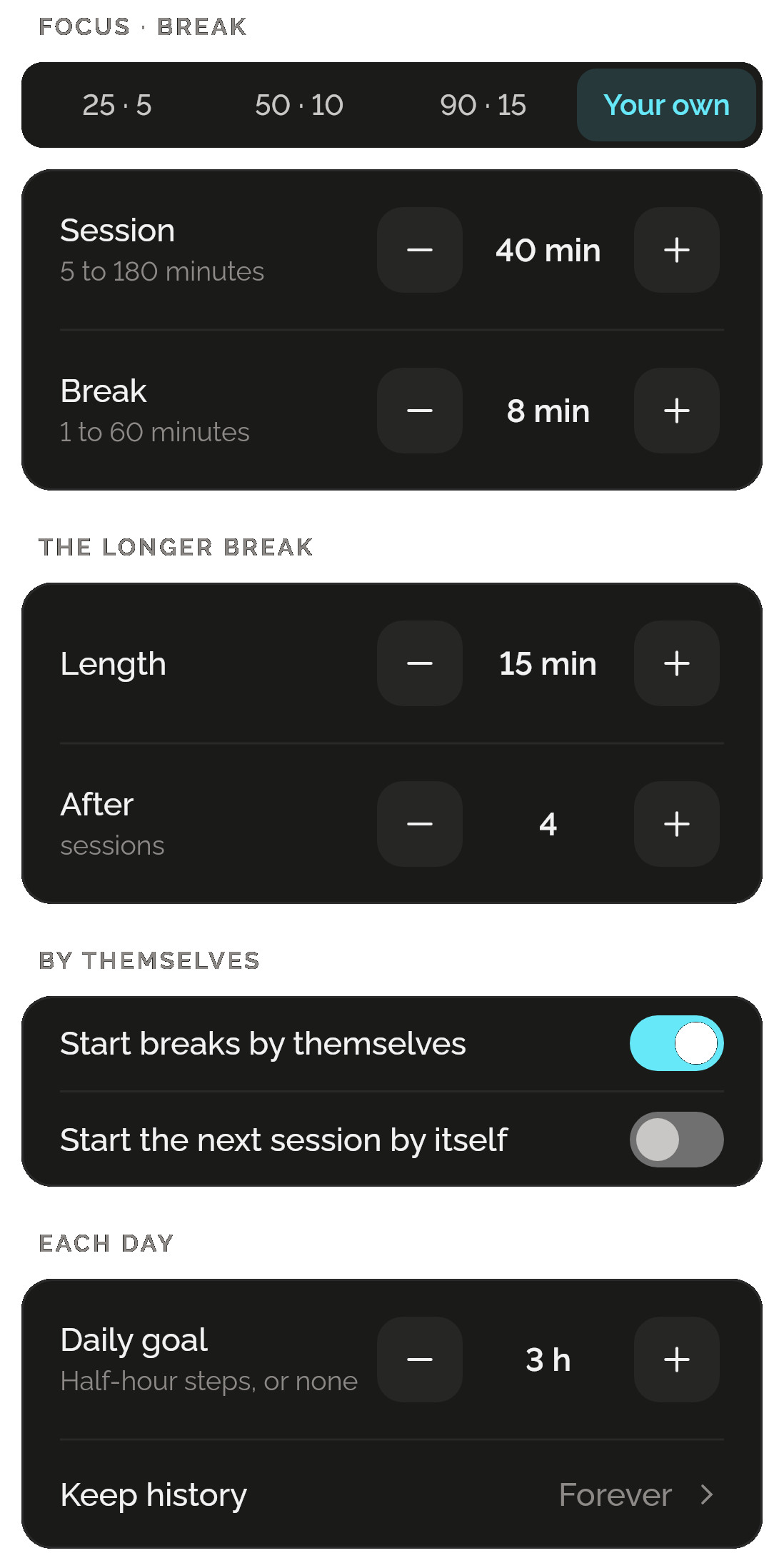
Focus settings: Focus · break with Your own chosen, Session 40 min and Break 8 min; the longer break, 15 min after 4 sessions; Start breaks by themselves on and Start the next session by itself off; Daily goal 3 h; and Keep history, Forever.

Only want a focus timer? That’s all you get.

Focus lives inside Shadowkit, an app that starts empty. You add the skills you want, and no others come with them.

  1. Install Shadowkit

    Free on Google Play. No account, nothing to sign up for.

  2. Add Focus

    Tap “Add your first skill” and pick Focus.

  3. That’s your whole app

    No other skill is added. Add one later, or never.

ANDROID

On your home screen

Three widgets for your Android home screen. Timer is free; Today and History come with Pro.

  • TimerFREE

    What’s running and its label, the time left counting down, and one button that acts right on the widget: Start focus, Pause, Resume or Back to it now.

  • Today

    Today’s focused time against your goal, with its bar and the day’s sessions and breaks along the hours, and a chip that pauses what’s running.

  • History

    The last 7 days’ total and the average a day, over fourteen days as bars with the goal drawn across.

Free, and Pro

Free

  • The timer, its breaks and its notifications
  • Every session kept, by day and by label
  • Today, the history, What it went to and your own lengths
  • The Timer widget (Android)
  • A backup of the whole app carries your sessions and settings

Pro

  • The Today and History widgets (Android)

A day with 25 minutes of focus counts, and four such days in a week earn a gem; the milestones are in focused hours. If Pro ends, nothing you made is deleted.

What it keeps on your phone

  • What it keeps

    Every session of a minute or more and every break, with its day, its times and what it was for, and your Focus settings. Each profile keeps its own, and has its own timer. A running timer stays on the phone and isn’t in a backup.

  • Permissions

    Notifications, asked for as your first session starts, so it can ring; Alarms and reminders (exact alarms), so it rings on time; Run at startup, to put a running timer back after a restart. Shadowkit’s reminders and Toolbox’s timer use the same: Focus adds no permission.

  • Works offline

    Every part of Focus works without a connection, on Android now and on iPhone when it comes. On iPhone, a closed app rings at the next end; the countdown in the notifications, its buttons and the three home-screen widgets are Android’s.

Privacy policy

Questions

Does it ring if I close the app?

Yes, as long as notifications are allowed. On Android an alarm ends each session and break with the app closed, and a silent notification counts down with Pause, Skip to break and Stop; with Alarms & reminders off it may ring a few minutes late. On iPhone the next end rings with the app closed, and the one after it is set when you next open Shadowkit.

What if I stop or skip early?

What ran is kept, if it was a minute or more. Skip to break starts your break now; Stop ends the session and goes back to Ready. A paused session stays paused, even overnight.

Can I change what a session is for?

Yes, while it runs or is paused: tap the pencil beside its label, and the whole session counts for the new one. A label is up to 60 characters, and the ones you used lately are a tap away.

Is it the same Focus as on the computer?

The same skill, with the same rules, and it is on Linux computers too. Each keeps its own sessions: nothing syncs between your phone and your computer.

Is it free?

Yes: the timer, every session, Today, the history and What it went to, with no limit and no Pro. Of its three Android widgets, Timer is free and Today and History come with Pro. It earns gems too: a day with 25 minutes of focus counts, and four such days in a week earn one.

Guide

All posts

Start with Focus.

Free, except two widgets. No account, no sign-up, and it works without a connection.

Android now, iPhone soon

Add more when you want them

All skills

Get Shadowkit

Scan with your Android phone’s camera, or tap Google Play. iPhone is coming soon.Tap Google Play to get it. iPhone is coming soon.

iOS

App Store

Android

Google Play